Draw Menu
Draw commands are used to draw lines, arcs and other shapes. These can be used to represent water edges, bridges and other scenic features.

There are 4 command buttons on the tool-bar used to draw Straight Objects, Curved Lines, Circles and other Shapes. Each command button is followed by a button that changes the action (and Icon) on the command button.
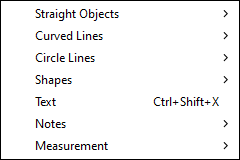
Functions for drawing basic shapes and objects like lines and curves can be accessed from this menu.
- Circle Lines - draw empty or filled circles. (Circles and Filled Circles)
- Curved Lines - are created in the same manner as curved tracks. (Curved Lines)
- Note - attach a note icon to a specific location on the layout. (Note Variants)
- Ruler - create ruler and set visibility (Ruler)
- Protractor - create protractor and set visibility (Protractor)
- Shapes - draw boxes, polygons and poly-lines. (Draw Shapes)
- Straight Objects - draw straight objects. (Draw Straight Objects)
- Text - allows entry of text directly onto the layout. (Text)
Some commands display controls on the Status Line (Main Window Overview) to change line width, color or other attributes of the object.
