Change Scale
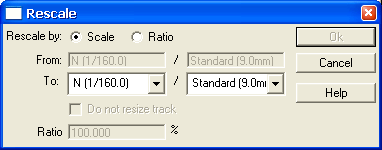
Change Scale is used to change the size and gauge of selected (Select) objects. The amount to resize can be specified
- by the modeling scale, e.g., convert from HO to O scale
- by the modeled gauge, e.g., convert from standard gauge to narrow gauge, or
- by ratio (by 181.5%).
If the selected objects have multiple Scales then the 1st From box will display "Multi-Scale". If the selected objects are all of one Scale and but have different Gauges then the 2nd From box will display "Multi-Gauge".
If resizing by modeling scale then track dimensions, e.g., lengths and radii, will be changed as well. An option is available to disable the resizing of the selected objects.
