Macro Menu
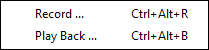
The Macro Menu shows commands that can be used to Record and Playback commands.
- Record - Displays the Record dialog (after prompting for a file name). The current layout state and most subsequent actions will be saved in the recording file.
- Messages can be inserted into the recording file by pressing the Message button on the Record dialog then entering a message in the text display.
- Press the End button to end entry of the message and resume recording.
- Press the Stop button to stop recording.
- Playback - Displays the Playback dialog (after prompting for a file name). This is used to playback previously recorded sessions. Note: the layout state will be saved during playbacks and restored after.
The Record command is useful if it becomes necessary to report a bug in XTrackCAD.
