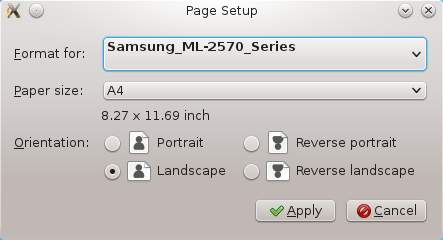
The Printer Setup dialog allows you to configure the application's use of the printer.
The Printer Setup window contains:
- Format for - a list to select a particular printer. The entries on this list are defined by printer lines in the ~/.xtrkcad/xtrkcad.rc file. The first entry, 'File', causes printouts to be sent to a file. You will be prompted for a file name when doing a print.
- Paper Size - a list of various supported paper sizes.
- Orientation - a Radio button to select various Landscape or Portrait formats. This setting is ignored, use the Page Format entry on the Print dialog.
- Apply - updates the data and ends the dialog.
- Cancel - ends the dialog without update.
Note - Printing uses a default of 600ppi. It scales the print and text from a default size of 72dpi. This is often the expected value for a standard printer driver to work correctly, but will not work if the driver is not accurately setting the ppi available. To override the printer ppi you can use either the configuration file settings for print or environmental variables. These values are set in the Preferences section.
Preferences.PrintScale - The floating point ratio of the real printer dpi to 72.
Preferences.PrintTextScale - The floating point ratio of the real printer text support to a dpi of 72. This value has no effect unless PrintScale is set to > 0.0.
These values can also be set using environmental variables if the configuration preference values are not set or they are set to <=0.0.
XTRKCADPRINTSCALE
XTRKCADPRINTTEXTSCALE
