Add Menu
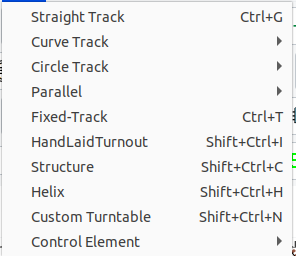
The Add Menu has all the actions related to adding track pieces to the layout.
- Straight Track Ctrl+G - lay straight track pieces of arbitrary lengths
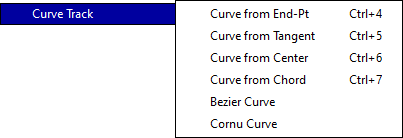
- Curve Track - lay curved track pieces using different modes for selecting start and endpoints and radius (Curved Track).
- Circle Track - place a circle of track by selecting radius, tangent and or center (Circle Track).

- Parallel - create parallel track or line to existing flex-track, straight or curved track. (Parallel Track or Line)

- Fixed-track Ctrl+T - select a piece of Fixed-track and place on layout.
- Hand-laid Turnout Ctrl+Shift+I - lay a turnout in place on the layout. (Hand-laid Turnouts)
- Structure Ctrl+Shift+C - Add a predefined structure to the layout.
- Helix Ctrl+Shift+H - Add a helix. (Helix Track)
- Custom Turntable Ctrl+Shift+N - Place a turntable. (Turntables)
- Control Element - Create a control element.
- Block - Create a block. (Block)
- Switchmotor - Create a switchmotor. (Switchmotor)
- Signal - Create a signal. (Signal)
- Control - Create a control. (Control)
- Sensor - Create a sensor. (Sensor)
- Straight Track
- Structure
- Fixed-track
