Easements
Easements are special sections of gradually curving track used to connect straight and curved tracks (or two curved tracks). Easements reduce the effects of sudden changes in track curves which can cause jerky motion and derailments.
Easements can be created every time you Join (Join Tracks and Lines) tracks, Extend (Extending Track Length) a track or create a Tangent (Creating a Tangent to a Curve) track.
When using easements, an error message will be generated if tracks have a radius that is too small or are too short for the transition curve.
The Easement dialog is invoked from the Options (Options Menu) menu.
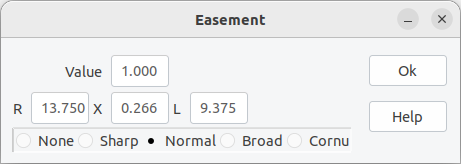
- Value - allows fine tuning of the easement parameters (restricted to values >= 0.5).
- R - minimum radius of the curved track.
- X - offset between a straight and curved track.
- L - length of the transition track.
- Radio button group with None, Sharp, Normal, Broad and Cornu. Corresponding Values for these buttons are 0, 0.5, 1.0, 2.0 and -1.0. Select None to turn easements off.
For traditional fixed sharpness easements see Easements with Fixed Sharpness, for Cornu Easements see Cornu Easements.
