Options Menu
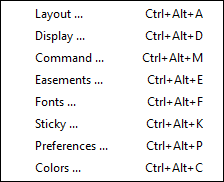
The Options Menu shows commands to change configuration options.
- Colors - Displays the Colors (Colors Dialog) dialog.
- Command - Displays the Command Options (Command Option Dialog) dialog.
- Display - Displays the Display (Display Dialog) dialog.
- Easement - Displays the easement (Easements) dialog which controls how easements (spiral transition curves) are used to join tracks.
- Fonts - Displays the font selection (Font Selection) dialog which selects the font used by the text (Text) command. This command is only available on UNIX based systems.
- Layout - Displays the layout (Layout Dialog) dialog.
- Preferences - Displays the Preferences (Preferences Dialog) dialog.
- Sticky - Displays the Sticky Commands (Sticky Dialog) dialog.
- Debug - Only shown when extra/developer buttons are enabled. Displays a dialog listing every debug log category with a level control for each, plus a Test Mallocs button, for developers investigating an issue.
