Preferences Dialog
This dialog controls some parameters which likely will not be changed frequently.
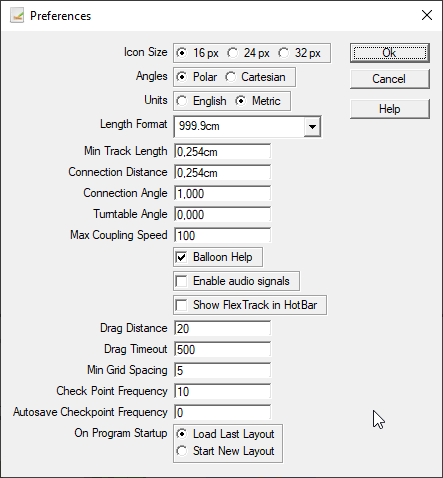
- Angles - controls the angle system. Polar: 0° is up and angles are measured clockwise, or Cartesian: 0° is to the right and angles are measured counter-clockwise.
- AutoSave AutoSave - specifies the number of Check Points taken before an AutoSave. The same number of checkpoints are retained in a circular archive set in the (Working Directory) named for the layout file. Setting this value to 0 disables AutoSave.
- Balloon Help - disables the display of Balloon Help (Window Terms) which usually is shown when the cursor is placed over a control.
- Enable Audio Signals - turns on beeps for positive confirmations and warnings.
- Show Flex-track - disables the display or Flex-track (XTrackCAD Terms) which is shown on the left of the Toolbar.
- Check Point AutoSave - specifies the Check Point frequency; the number of modifications made to the layout since the last save. The layout is automatically saved to the Check Point file (Working Directory) when the Check Point frequency is reached. Setting this value to 0 disables use of the Checkpoint file and AutoSave. Upon restart, if the program was not saved normally, the user will be prompted to see if they want to resume at the last checkpoint.
- Connection Angle - as below for Connection Distance for the angle between endpoints.
- Connection Distance - the maximum distance between endpoints that can be connected. This affects the Join (Join Tracks and Lines) command and auto-connection during Parallel (Parallel Track or Line) commands and placing Turnouts (Hot Bar). The default value for this field is 0.100 inches or 0.254 CM. Changing this value is not recommended.
- Drag Distance - controls how far you can move the cursor (in pixels) before XTrackCAD considers the action to be a drag instead of a click.
- Drag Timeout - controls how long you can hold a mouse button down (in milliseconds) before XTrackCAD considers the action to be a drag instead of a click.
- Length Format - controls how lengths are displayed. Combinations of feet and inches (or meters, centimeters and millimeters) with support for decimal or fractional measures. Note: lengths can be entered in any format and are converted on entry.
- Max Coupling Speed - trains (Train Mode) moving faster than this speed will crash when running into other trains or hitting the end of a track or an open turnout. Crashed trains must be manually moved back onto the track.
- Min Grid Spacing - minimum distance between Grid (Grid Dialog) lines (in pixels). If the grid lines are closer then drawing them is suppressed.
- Min Track Length - specifies the minimum length of a track. Shorter tracks will not be created.
- On Program Startup - if set to "Load Last Layout", XTrackCAD will automatically re-open the layout file that was open when XTrackCAD last closed. Selecting "Start New Layout" opens a blank layout canvas.
- Turntable Angle - minimum angle between adjacent tracks connected to a Turntable (Turntables).
- Units - choose between English (inches) or Metric (centimeters) measurements.
- Write Settings - Save the current settings to a named settings file
- Read Settings - Load settings from a named settings file
