Printer Margin
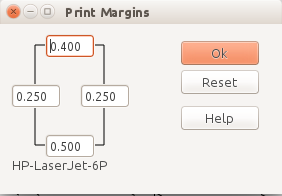
The Printer Margins dialog allows you to configure the selected printer's margins.
The margins for the four edges of the printed page are displayed. The default values are fetched from the Operating System. You can enter updated values if the System values don't match your actual printer.
The Reset is enabled if the displayed values don't match the System values and will reload the System's values.
To check your printer's margin:
- Set Scale to 1
- Set Origin and Angle to 0.000 by clicking the Reset button
- Enable Registration Marks this prints crosshairs every 3" or 10cm at scale 1:1. - Enable <b>Ignore Page Margins</b> - Select and <b>Print</b> the lower left page of you layout - Measure the distance from the left and bottom edges to the Registration Mark at (3",3") or (10cm,10cm).
- Update the Printer Margin values for the left and bottom edges. You can also update the top and right edges.
Margins values are stored for each printer.
You can also load PrinterMarginTest-A4.xtc or PrinterMarginTest-Letter.xtc from Help|Examples. These files have registration lines in the corners to help determine your printer's margins.
