Disconnect Joint
Disconnecting a joint between two pieces of connected track;
Click the Split button ( ) to activate the Split command.
Place the mouse pointer right over the joint between the two track endpoints (so the "X" is shown) then Left-Click.
A blue marker will show where a split will occur, but if the cursor is a near connected joint, it will show a blue "X".
- When the Split command completes, the joint at the two track endpoints will show three lines rather than one. The three lines represent abutted, disconnected track endpoints.
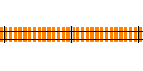
- Joint prior to split
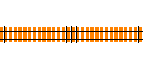
- Joint following split
For detail about;
- Dividing a section of track into two connected pieces see Divide Track.
- Creating block gaps at an existing joint see Adding Block Gaps.
