The Turnout Density Report command lists, for each layer with any track on it, the total track length in feet, the turnout count, and the turnout density (turnouts per 100ft of track) – one row per layer, sorted by density, highest first. A layer whose density exceeds 10 turnouts per 100ft is flagged HEAVY (a common sign of a staging yard or other switching-heavy area).
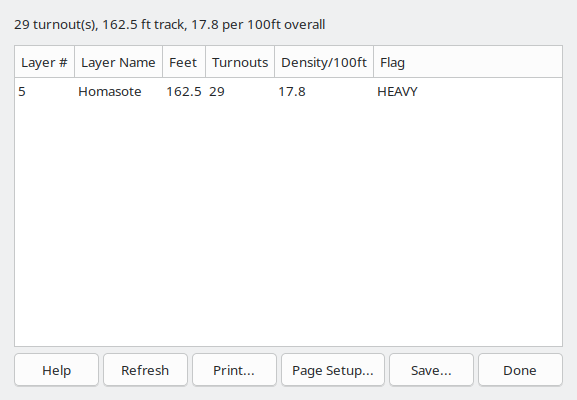
A summary line above the list gives the layout's total turnout count, total track length, and overall density, updated whenever the report is generated or refreshed.
"Turnout" here means any turnout-type track object, which includes crossings and single/double slip switches alongside ordinary turnouts – XTrkCAD stores all of these as the same underlying track type, since they're all compound, parameter-file-defined track pieces. A layout with plain turnouts plus a few crossings or slips will show a higher count here than a simple tally of powered switch machines would suggest.
Unlike the Parts List (Parts List) command, this report always covers the whole layout; it does not consider the current selection (Select).
Any turnout with fewer than 3 endpoints (possibly broken or incomplete) is listed separately in the Save.../Print output, under PARTIAL TURNOUTS; the summary line notes when any exist. Unlike the Unconnected Endpoints Report (Unconnected Endpoints Report), this report has no click-to-navigate – it's a layout-wide statistic, not a list of specific locations to visit.
The Refresh button recomputes the report in place – useful after changing turnouts or track elsewhere in the layout, without closing and reopening the report window.
The Save As... button opens a File Save dialog window that's used to name and save the report to a text file.
The Print button opens the Print dialog which is used to print the report.
The Filter... button (Filter Layers/Groups) opens a dialog to scope this report to specific Layers/Groups (Layer Groups Dialog) – every layer is included by default.
The Done button closes the Turnout Density Report window.
