Colors Dialog
The Colors dialog is invoked from the Options (Options Menu) menu
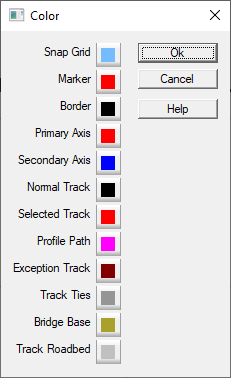
The Colors dialog controls the color that various objects are drawn.
- Border - Sets color of Rulers, Room Boundaries and Table Edges.
- Exception Track - Sets color of Exceptional Tracks (Layout Dialog). Those which exceed the specified grade or are have a radius smaller than the minimum set.
- Marker - Sets color of short lines drawn on the Ruler of the Main (Main Window Overview) window to indicate cursor position.
- Normal Tracks - Sets color of normal track.
- Primary Axis - Sets color of the large cross displayed when positioning the Snap Grid (Grid Dialog) or the Print Grid (Printing).
- Profile Path - color of the path when using the Profile (Profile) command.
- Secondary Axis - Sets color of the large cross displayed when positioning the Snap Grid (Grid Dialog) or the Print Grid (Printing).
- Selected Tracks - Sets color of Selected track.
- Snap Grid - the Grid displayed by the Snap Grid (Grid Dialog) dialog.
- Track Ties - color of ties (if drawn).
- Bridge Base - color of Bridge fill between the parapets.
- Track Roadbed - color of Roadbed fill under the track.
- Report Indicator - color of the temporary marker drawn on the layout when a row is selected in a Reports (Reports Menu) window, e.g. the Unconnected Endpoints Report (Unconnected Endpoints Report).
