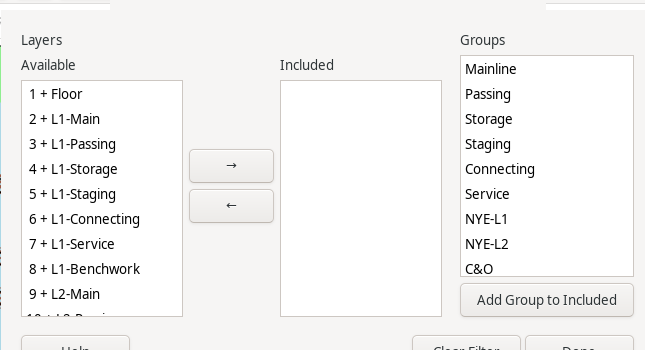
The Filter Layers/Groups for Print/Export dialog scopes Print (Printing), Export to DXF (Export to DXF), and Export to SVG (Export to SVG) down to specific Layers and/or Layer Groups (Layer Groups Dialog) – the same Available/Included/Groups dialog and mechanics as the Reports menu's own Filter Layers/Groups dialog (Filter Layers/Groups), but a single filter shared across Print and both Export commands, not one per report.
Unlike a report's filter, this one only ever narrows what a Layer's own visibility (Layers Dialog) already allows through – including a hidden layer here does not make it print or export; it still has to be made visible first. Once at least one layer is included, it also fully replaces the current selection (Select) as the export scope for DXF/SVG, rather than requiring you to select matching tracks by hand first.
Reachable from the File menu (File Menu), or from the Filter Layers/Groups... button on the Print (Printing) dialog – both open and edit the same shared filter.
The Clear Filter button restores the unfiltered state: Print scoped only by Layer visibility, and Export scoped only by the current selection (or every visible object, for SVG, if nothing is selected).
The Done button closes the dialog.
