Manage Menu
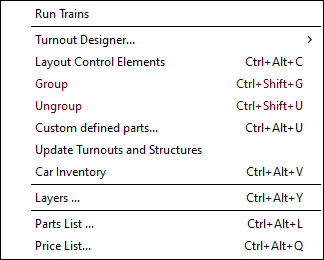
The Manage Menu shows commands affecting the Main Canvas (Main Window Overview).
- Car Inventory – update your list of cars and locomotives.
- Custom Management – manipulate custom turnout, structure and rolling stock designs.
- Layout Control Elements Dialog – manipulate blocks, turnout motors and signals.
- Group Dialog – creates a Structure or Turnout definition from the selected (Select) objects.
- Layers Dialog
- Layer Groups Dialog
- Manage Notes Dialog
- Parts List – lists all selected turnouts and sectional tracks and the total length of flex-track.
- Price List – specify prices for tracks and structures.
- Train Mode – run trains on the designed layout.
- Turnout Designer – a menu list of Turnout Designer dialogs.
- Update Turnouts and Structures – replaces any selected (Select) Turnouts and Structures with the definitions from updated parameter files (Parameter Files).
- Ungroup – breaks apart any selected (Select) turnouts and structures into their basic lines (Draw Menu) and track segments.
